CRIT Studio · CRIT Bridge · released v1.0.1
Figma frames, in After Effects as real layers.
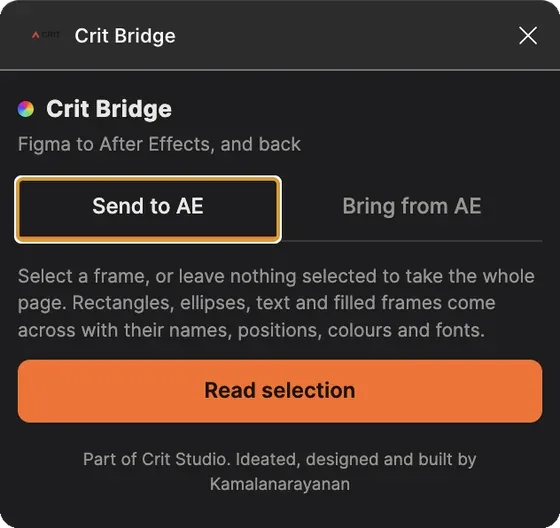
Rectangles, ellipses, text and filled frames arrive as actual layers, with their names, positions, colours and fonts intact. Not a flattened PNG, not a screenshot to trace over.
Get the plugin on Figma Community
Both directions of the same plugin
The problem it solves
Designing in Figma, animating in After Effects.
The handoff between the two is usually a flattened export and a rebuild. You redraw the shapes, retype the text, re-enter the hex codes, and hope you read the spacing correctly. Any change in Figma means doing it again.
CRIT Bridge moves the structure rather than the picture. A selected frame, or a whole page, arrives in After Effects as layers you can animate, with the names you gave them in Figma so the timeline is legible to whoever opens it next.
Fonts are the part that usually goes wrong silently. If you do not have a face installed, the plugin reports it at import instead of substituting something close and letting you discover it at render.
Fonts you do not have installed are reported rather than swapped silently, so you find out at import instead of at render.
Design principle
Specifics
What crosses, in both directions.
Send to After Effects
Select a frame in Figma, or take the whole page, and read the selection. Shape, text and frame layers cross with their names, positions, colours and fonts. What arrives is editable, not baked.
- carriesNames, positions, colours, fonts
- layer typesRectangles, ellipses, text, filled frames
- scopeA selected frame, or the whole page
- fontsMissing faces are reported, never silently substituted
Bring a palette back
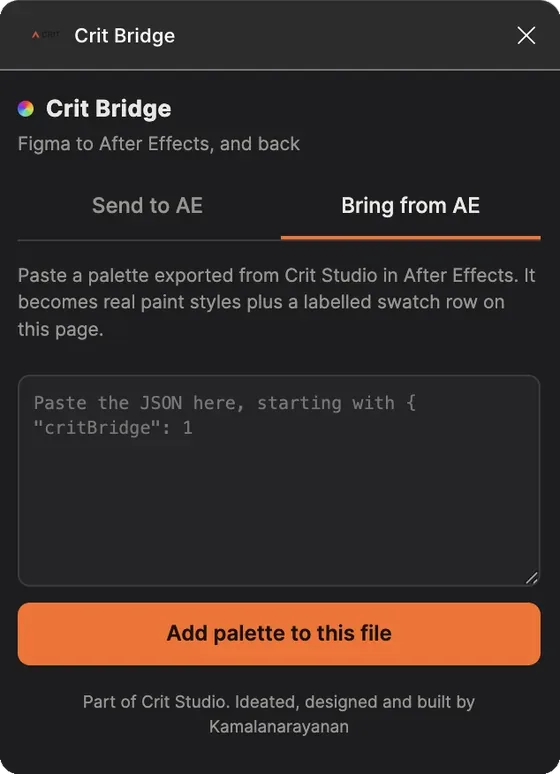
Export a palette from Crit Panel, paste the JSON into the Bring from AE tab, and the colours become Figma paint styles. The return trip is a paste rather than a live connection, which is the honest limit of the current version.
- inputPalette JSON exported from Crit Panel
- outputFigma paint styles
- limitsPasted JSON, not a live link between the two files
Install
From the Figma Community, like any other plugin.
Open the plugin page in the Figma Community and run it from any file. It works alongside Crit Panel, which is where palettes are made and where an imported Bridge file can be read.
The student and studio builds apply to this plugin as they do to the panel. The difference between them is the AI layer and whose keys it runs on, not the features you get.
Get the plugin
Known limits. The palette return trip is pasted JSON, not a live link. Changes made in Figma after an import do not propagate to layers already in After Effects; send the frame again.
Releases
What changed, and when.
- v1.0.1Current build. Submitted to the Figma Community.
Earlier build history is being reconstructed and will be added here rather than rounded up.